Type of Work Classification
Type of Work Classifications are Inventory Departments included in a Classification such as Dispatch Type of Work. Types of Work can be set up in Agvance Windows by selecting Department Classifications on the Product tab at Hub / Setup / Company Preferences. Choose Add, then enter the Name of the Department Classification. Double-click the Dept. ID or Department Name heading to choose the necessary service fee departments.
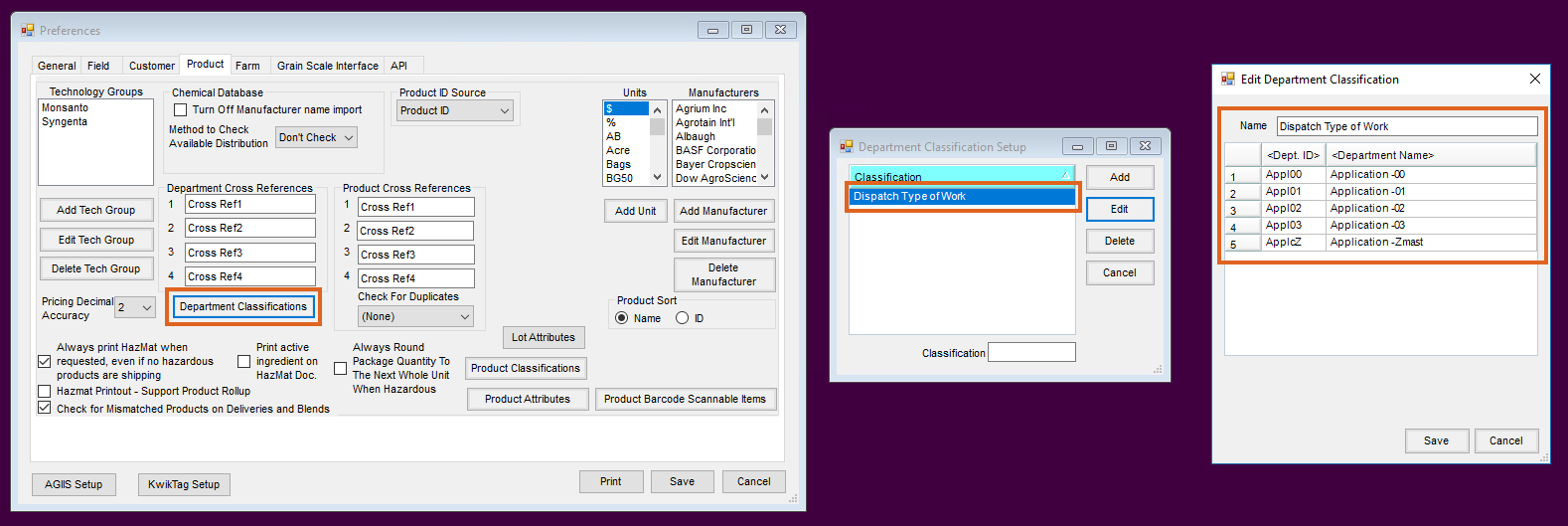
After setup is complete, select Save.
In Agvance SKY Dispatch, choose which Department Classification to use for Types of Work used in Agvance SKY Dispatch.
Note: Only one Classification can be selected at a time.

Priority
Add, edit, or change the color for Priority labels. Selecting the Edit icon displays the Edit window. The priority label must be 6-30 characters long. Select the color for the priority from a pre-defined list of colors.
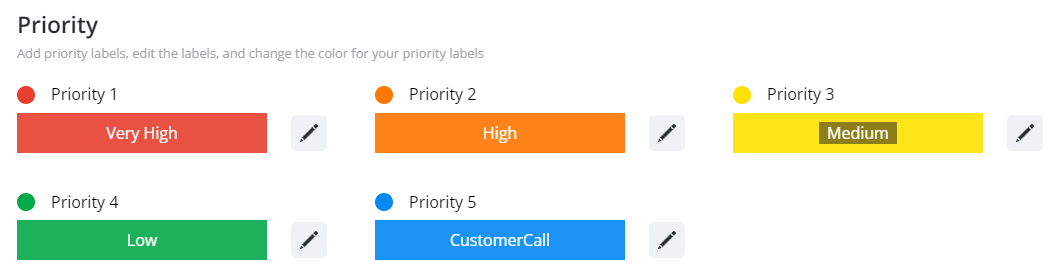
The Priority will be reflected on the jobs in the Priority column.

Map
Change the color of different features displaying on the map:
- Selected Jobs
- Crop Chemistry
- Selected Applicator
- Assigned Jobs
- Driftwatch
- Unassigned Jobs
- Non-Field Features

Select the Edit icon to see a preview of the feature on the map and to change the color.

