The Satloc Integration gives the ability to manually upload. Job files to Satloc and assign aircraft to the jobs directly from Agvance SKY Dispatch.
Setup in Agvance SKY Admin
An administrator must first enable the integration by entering the required API credentials.
- Navigate to Agvance SKY Admin / Dispatch.
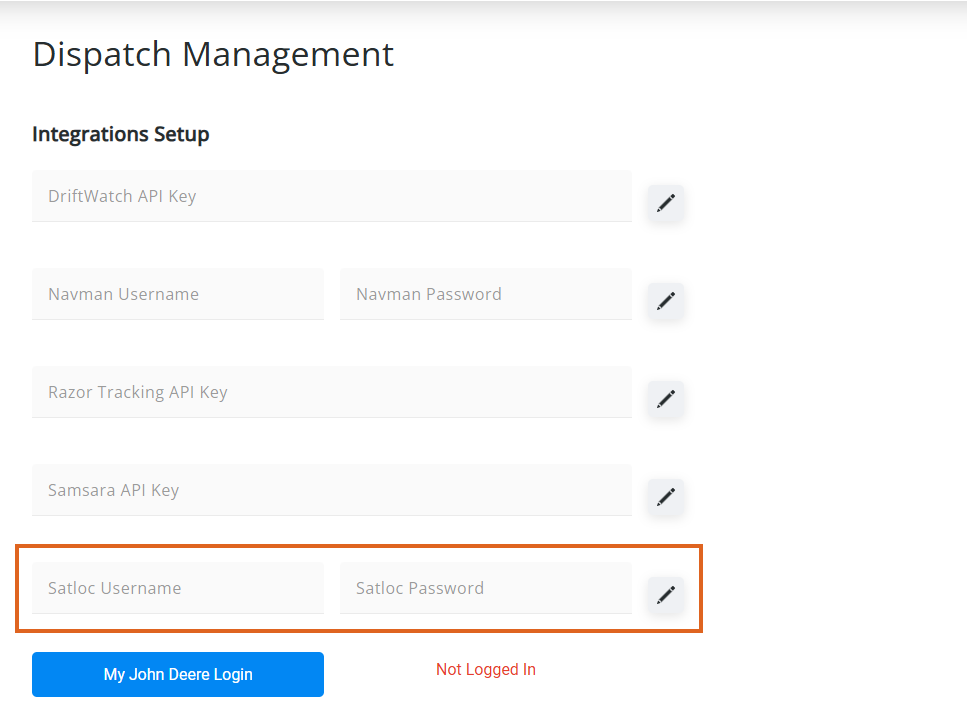
- In the Integrations Setup section, enter the Satloc Username and Satloc Password.
Note: A Satloc Username and Password will need set up as a Vendor user within the Satloc Cloud prior to establishing a connection.
- Select the Edit icon to save the username and password.
- Once the login is validated, it will save.
Note: The Satloc credentials can be removed after validation by selecting the Delete icon.
Setup in Agvance SKY Dispatch
- Navigate to Agvance SKY Dispatch / Company Settings / Integrations.
- Select + Add Integration.
- Complete the setup fields:
- Vehicle – Select the Vehicle to link.
- Integration Type – Select Satloc.
- Machine ID – Select the unique identifier of the Satloc asset.
- Machine Alias – This defaults as Machine ID but can be edited.
- Map Icon – Choose a visual icon to represent the asset.
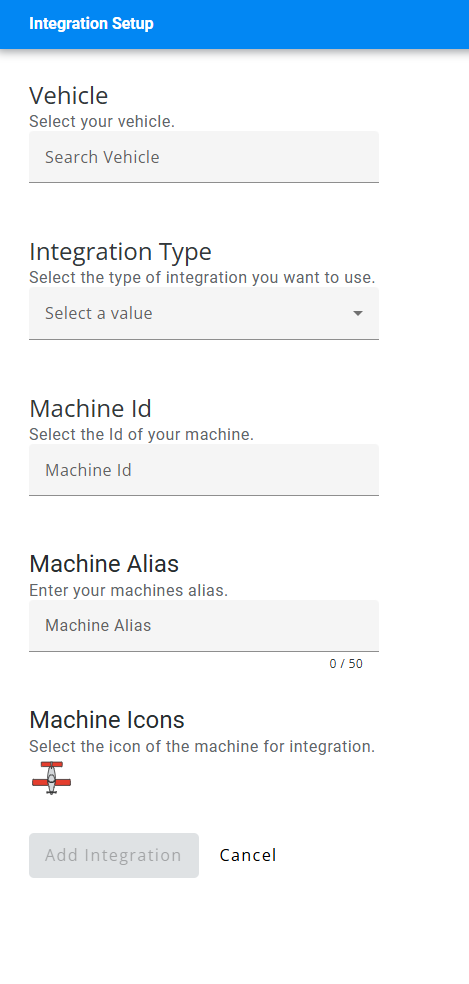
- Choose Add Integration to complete connection.
