Integrations Setup
Select the Edit icon to enter a DriftWatch API Key to display sensitive crop information alongside field boundaries on maps in Agvance SKY Dispatch and Agvance Ops.
Additionally, a Navman Username and Navman Password can be entered to tie vehicles in Agvance SKY Dispatch to a Navman device. Select the Delete icon next to saved credentials to remove them.
A Razor Tracking API Key can be entered to connect Razor-equipped vehicles. See Razor Tracking - Agvance SKY Dispatch for setup steps.
A Samsara API Key can be entered to connect Samsara-equipped vehicles. See Samsara - Agvance SKY Dispatch for setup steps.
A Satloc Username and Satloc Password can be entered to connect a Satloc Cloud account for aerial application job files. See Satloc Aerial Integration - Agvance SKY Dispatch for setup steps.
Choosing the My John Deere Login button here navigates to the login page for My John Deere. This gives the ability to be signed into My John Deere within Agvance SKY at the Company level. The red Not Logged In text displays to indicate there is no connection to a My John Deere account.

Slingshot
Under Slingshot, a Slingshot URI and one or more Slingshot Keys can be entered to connect devices through Raven Slingshot. See Slingshot - Agvance SKY Dispatch for setup steps.

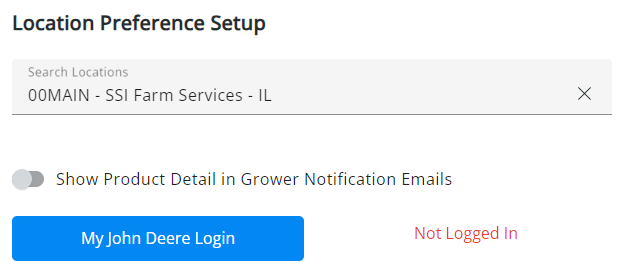
Location Preference Setup
In the Location Preference Setup section, the Location selected in the Search Locations drop-down will be the one affected when turning preferences on or off.
The Show Product Detail in Grower Notification Emails option is defaulted to off for each Location.
With this option turned on, the email sent will include estimated Product totals and Product details.
Choosing the My John Deere Login button navigates to the login page for My John Deere. This gives the ability to be signed into My John Deere within SKY at the Location level. The red Not Logged In text displays to indicate there is no connection to a My John Deere account.