The Samsara Integration gives the ability to view real-time location data directly on Agvance SKY Dispatch and Agvance Ops maps. By bridging third-party tracking with Agvance, this integration ensures dispatchers can monitor fleet movement and job status in a unified interface.
Setup in Agvance SKY Admin
An administrator must first enable the integration by entering the required API credentials.
- Navigate to Agvance SKY Admin / Dispatch.
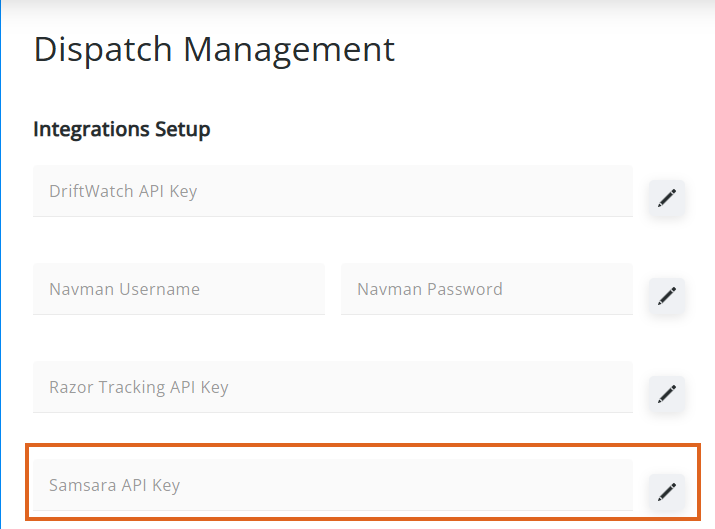
- In the Integrations Setup section, enter the Samsara API Key.
- Select the Edit icon to save the key.
- Once the key is validated, it will save.
Note: The Samsara API Key can be removed after validation by selecting the Delete icon.
Setup in Agvance SKY Dispatch
- Navigate to Agvance SKY Dispatch / Company Settings / Integrations.
- Select + Add Integration.
- Complete the setup fields:
- Vehicle – Select the Vehicle to link.
- Integration Type – Select Samsara.
- Machine ID – Select the unique identifier of the Samsara asset.
- Machine Alias – This defaults as Machine ID but can be edited.
- Map Icon – Choose a visual icon to represent the asset.
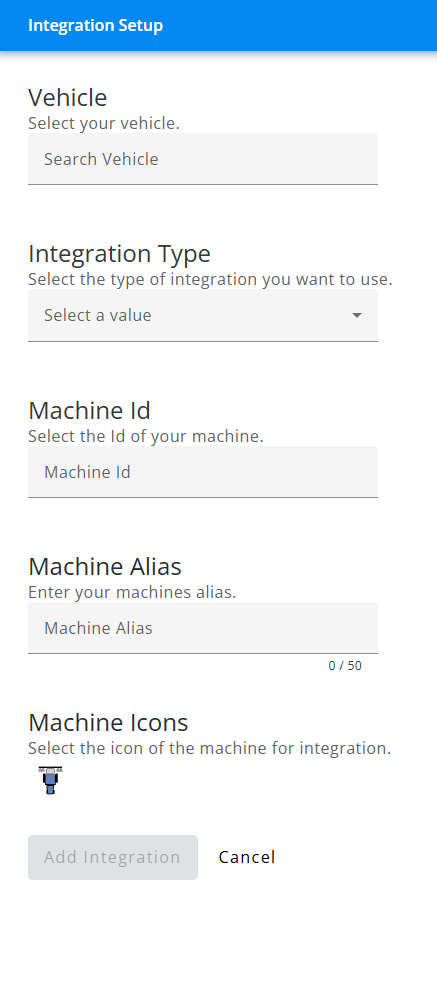
- Choose Add Integration to complete connection.
