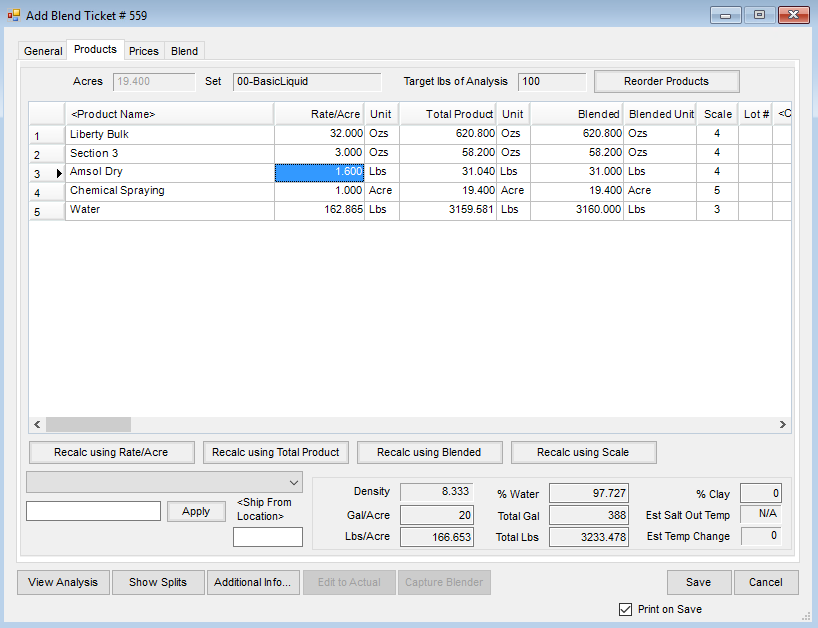
Direct Request Blend Tickets are used when certain Products are directly requested at a specified rate or total amount. This method assumes the exact Product quantity and/or rate desired for the blend is known. Below is an example of creating a basic Blend Ticket by Direct Request using a Basic Dry Product Set. The steps to create the ticket would be the same if using a Basic Liquid Product Set.
Note: This method is also used to create Blend Tickets for chemicals and water. The typical entry order for items is fertilizer, chemicals, and then services. The only restriction on entry order is an Analysis item must be the first item on the list for fertilizer mixes. Analysis and non-analysis items may be in any order after the first line.
Direct Request Process

- Navigate to Blending / File / Open / Blend Ticket.
- On the Select a Blend Ticket window, choose the Customer and Field, then select Add.
- On the Select a Field window, verify the Bill Splits and choose OK.
- On the General tab, choose a Crop, Placement, and enter any Billing Notes.
- Enter the Quantity, and select the unit of measurement.
- Indicate the Product Set, Optimize By, and Price By.
- On the Products tab, double-click the Product Name column heading, choose the Products to be included on the Blend Ticket, and select Done.
- A specific Product rate per acre or rate per ton can be requested for the Product. After entering the Rate/Acre, select Recalc using Rate/Acre to calculate the total amount of Product needed.
- Optionally enter the Total or Blended amount of a Product and have this back-calculate the rate per acre of the Product by choosing Recalc using Blended.
- Select Save.
Direct Request w/ Fertilizer Additive
The Rate/Acre Calculator is built into the Blend Ticket and Field Plan to calculate certain Products per ton or per 100 gallons when creating a Blend Ticket by the acre. This tool calculates Product amounts to use in dry fertilizer and chemical blends such as Agrotain, Nutrisphere, and surfactants.
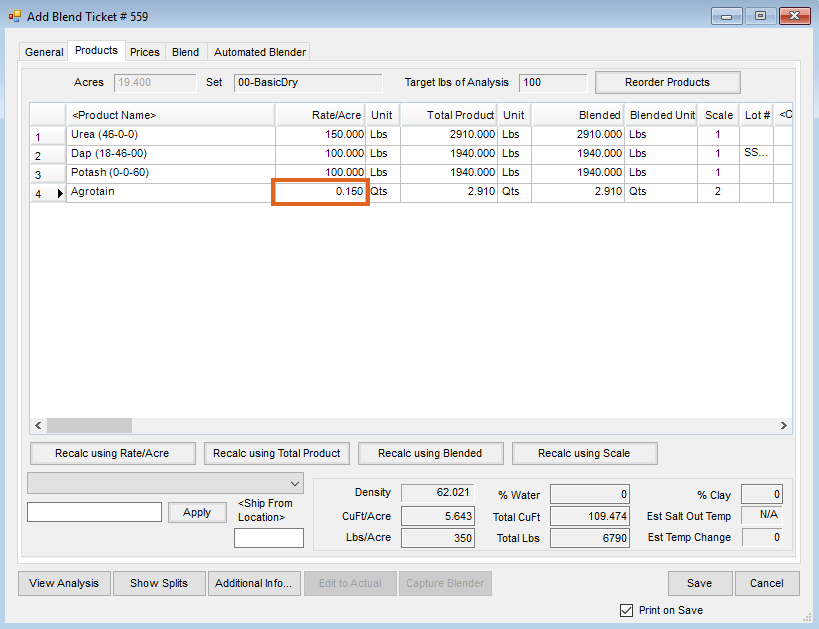
- Example 1 – Dry fertilizer Blend Ticket with Urea, Dap, Potash, and Agrotain Nitrogen Stabilizer to treat the Urea
- Example 2 – Chemical Blend Ticket using Liberty, Section 3, Amsol Dry, and Water
Example 1
- Select the Products, enter the Rate/Acre for all the Products except Agrotain, then select Recalc using Rate/Acre.
Note: An analysis can be optionally formulated to calculate the Products and Rate/Acre. - Right-click the Rate/Acre cell of Agrotain to open the Rate/Acre Calculator window.
- Uncheck all Products except Urea so the rate/ton of Agrotain is calculated based on only the quantity of Urea in the blend. Another option is to select UnTag All then select the Urea Product.
- Enter the rate of Agrotain per 2000 lbs of Urea to be applied. For this example, Agrotain is going to be applied at 2 Qts Per 2000 Pounds of Urea.

- Upon selecting Done, the Rate/Acre of Agrotain is calculated from the total quantity of Urea in the blend.

Example 2
- Select the Products and enter the Rate/Acre for all Products except Amsol Dry. In this example, the Water was calculated using the Adjust Water to Gal/Acre option.
- Select the Rate/Acre cell of Amsol Dry, then right-click to open the Rate/Acre Calculator window.
- Leave all Products checked to calculate the rate of Amsol Dry based on the total gallons of solution. Enter the rate per 100 gallons of solution. This example uses a rate of 8 Lbs Per 100 Gallons of solution.
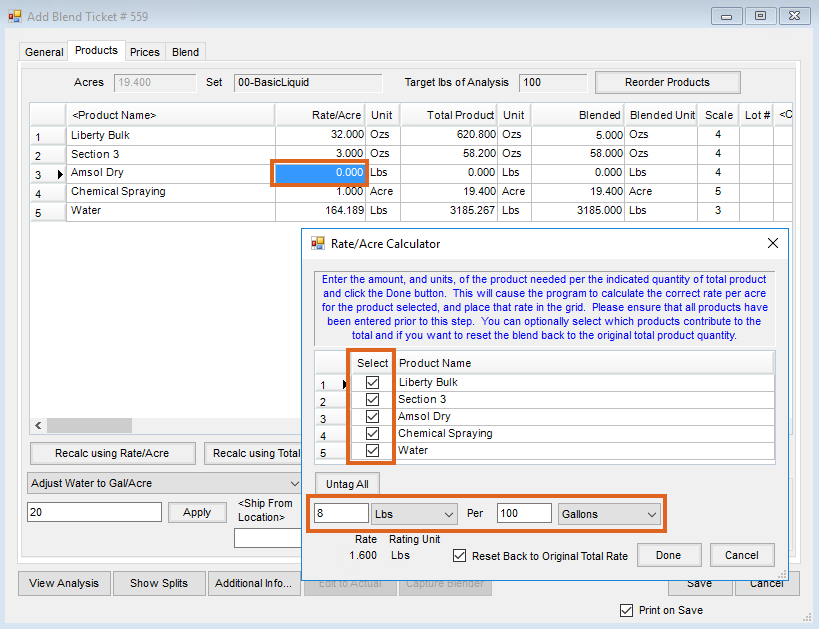
- Once the rate per 100 gallons has been entered, select Done. The Rate/Acre of Amsol Dry is calculated based on the total gallons of the solution.