The Purchase Order Export allows retailers to send crop protection Purchase Orders direct to Winfield through web services.
Note: Currently only Winfield offers importing and exporting crop protection Purchase Orders. For more information on B2B Crop Protection Purchase Order export setup, see here.
- Navigate to Accounting / Inventory / Purchase Order and select Add. Select the Vendor used for Winfield.
- Enter a P.O. # and double-click Product Name to select the crop protection Products to add to the Purchase Order.
- In the Notes section, optionally add information to be sent to the supplier as a general instruction.
- Optionally, navigate to the Ship To tab and enter information in the Delivery Instructions section to be sent as Shipping Instructions to the supplier.
- On the PO Detail tab, the Delivery Type can be set to Pickup or Delivery and is communicated to the supplier.
- Choose the Date Requested and select Apply.
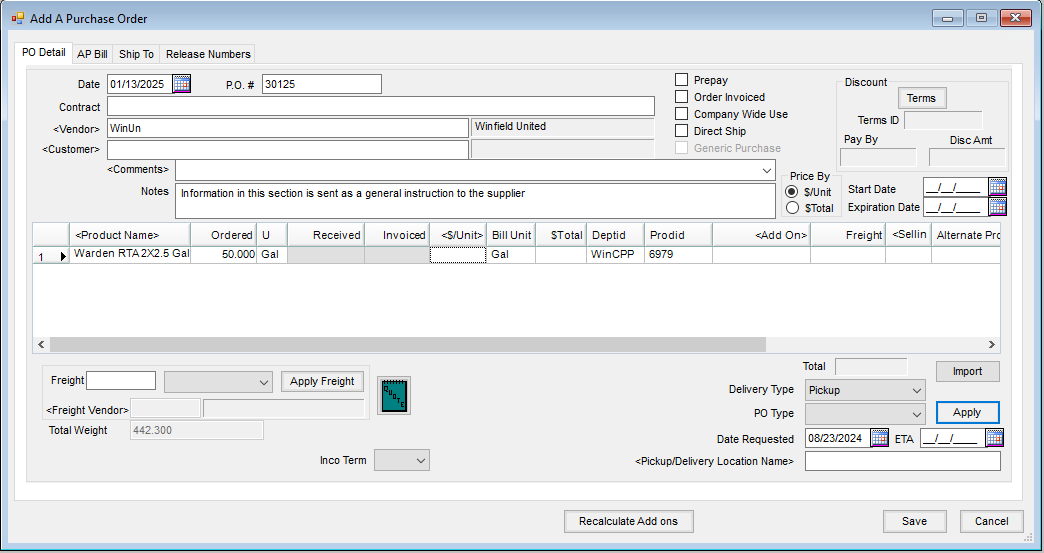
- Select Save.
- On the Print a Purchase Order screen, select the WS XML Purchase Order option to send the PO directly to Winfield. Select Print.


