- SKYC-3783 / Date Range Selection in Quick Filters – Quick Filters now support relative date ranges, allowing filters to remain relevant without frequent updates.
- Why – This change enables users to specify relative date ranges for their Quick Filters, which improves functionality.
- When/Where – Within SKY Dispatch / Personalize / Quick Filters, users can now select Today, Tomorrow, or a selected number of days.
- Action Needed – Update Quick Filters as needed to filter by Ordered, Requested, or Completed date ranges.
- SKYC- 3715/ Job Data Labels Info – Job data labels for Blend Tickets can now display both Job and Field information at the same time.
- Why – This change allows Job and Field information to be displayed together within Job Data Labels, providing clearer visibility on the Map View.
- When/Where – Within Map view, Job Info and Field Info can both be enabled at the same time.
- Action Needed – No action is required.
- SKYR-923 / Booking Detail on AR Invoice View – When reviewing an AR Invoice, a Bookings Used section displays if a Booking was used. If no Booking was used, the section will not display.
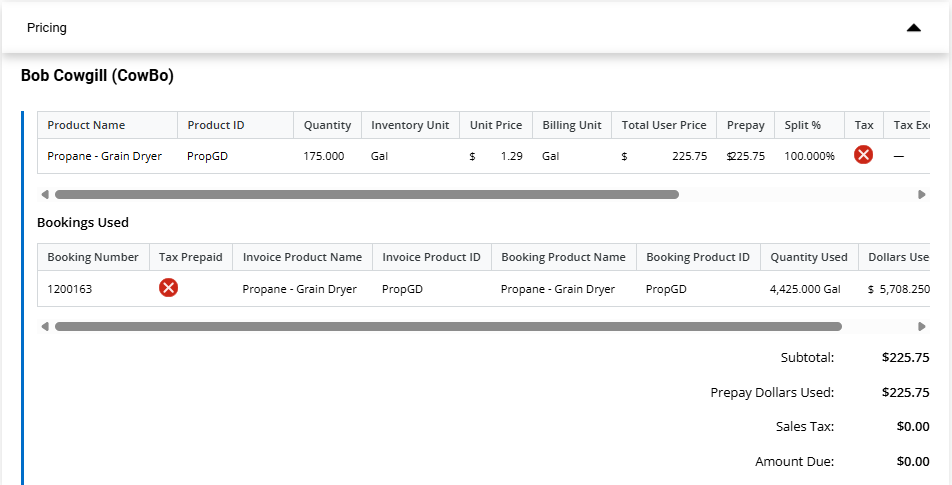
- Why – To offer more visibility to the Invoice from SKY.
- Action Needed – No action required.
- SKYR-1060 / Budget Billing Paid Status Link – Selecting the Paid status from Budget Billing tab opens the Customer's Payments page in SKY Customer in a new tab.
- Why – To give more visibility on billing details that already exists in SKY.
- Action Needed – No action required.
- SKYR-1113 / SKY Energy Map Updates –
- Select the Tank icon to see the entire tank list at that location. The yellow number indicator no longer appears.
- If the cluster has a number greater than 10 or the mean value of the average clusters in the area (whichever is higher), then the cluster shows as red. Otherwise, the cluster shows as blue.
- The zoom level is no longer limited when loading, panning and displaying to keep up to 10,000 tanks in view! View is limited to 10,000 tanks, if there are over 10,000 to display, the following message displays: View limited to 10,000 tanks. Zoom in or use filter panel to refine results. Open Filter Panel
Select Open Filter Panel to open the filter pane.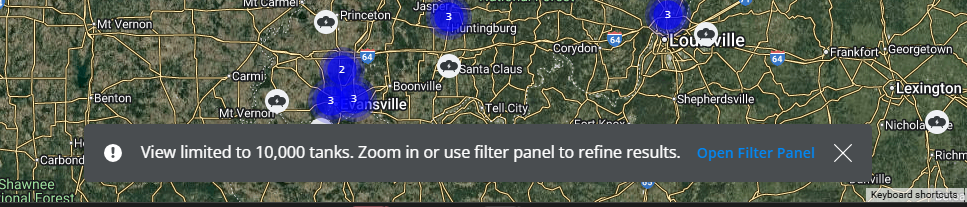
- Why – Loading time will no longer be limited, allowing for ease of zooming, panning, and viewing Tanks on the map.
- When/Where – These changes can be found on the Map tab.
- Action Needed – No action required.
- SKYR-1118 / Customer Credit Status to Add/Edit PDO – A Credit Status column is available in the Tank Details grid for that Tank’s Customer when viewing, adding, or editing a PDO.
- Why – To see a customer's credit status when creating PDOs and not entering Orders for those with poor credit issues, etc.
- When/Where – Tank Details grid when adding, editing, or viewing a Product Delivery Order.
- Action Needed – No action required.
- SKYR-1140 / View PDO links to SKY Customer – When viewing a Product Delivery Order, selecting Tank Serial Number opens the selected Tank information in a new tab and, with access to SKY Customer, selecting Customer Name opens the selected customer's SKY Customer page in a new tab.
- Why – To give more visibility of other SKY details related to PDOs .
- Action Needed – Access is necessary to view information linked to SKY Customer.
- SKYR-1143 / Add/Edit PDO links to SKY Customer – On the Add/Edit of Product Delivery Order, selecting Tank Serial Number opens the selected Tank information in a new tab, and with access to SKY Customer, Customer Name opens the selected Customer's SKY Customer page in a new tab. Also, to change or remove the selected Tank on a new PDO, select Remove Tank. That tank will be removed and the + Add Tank button will be visible again.
- Why – To give more visibility of other SKY details related to PDOs .
- Action Needed – Access is necessary to view information linked to SKY Customer.
Version 6.01
Web
- HW-12236 / Loadsheet Report – The Product Detail Loadsheet displays the correct total value when the oz/100gal unit is used for Chemical mixes.
- Why – Incorrect values were being displayed.
- When/Where – This will be seen when using units of oz/100gal.
- Action Needed – No action required.
- HW-12366 / Field Setup – The last save always overwrites previous edits.
- Why – Editing the same Field across different browsers (web/mobile) at the same time was resulting in blocking errors.
- When/Where – This update occurs when editing Fields in mobile and web at the same time.
- Action Needed – No action required.
- HW-12380 / Planting Import – Merging Planting data to the same Event in multiple import sessions works as expected.
- Why – Merging the Planting data was originally resulting in a blocking error.
- When/Where – This update can be seen when merging Planting data on a single Event.
- Action Needed – No action required.
- HW-12468 / Soil Type Report – The Soil Type Map report runs as expected.
- Why – Running the report was resulting in an error.
- When/Where – Numerous reports can be run without error.
- Action Needed – No action required.
Version 6.00
Web
- HW-12203 / Management Areas Agvance Crop Chemistry List – The Crop Chemistry and Crop Chemistry 2 Attributes within the Management Area were updated to the drop-down values of the Crop Chemistry in Agvance. Existing saved Management Areas allow clearing existing values using the drop-down values provided.
- Why – This change prevents entering incorrect values.
- When/Where – This can be seen in any Management Area that includes the Crop Chemistry or is a Crop Zone Management Area type.
- Action Needed – No action required.
- HW-12255 / Equation Recs Rounding – New rounding rules were implemented for SKY Recommendations:
• 1,000 - 1,500 lbs are rounded to 10.0 lbs.
• >1,500 lbs. are rounded to 100.0 lbs.
• <1,000 lbs. and >50.0 lbs. are rounded to 5 lbs.
• >50 - 1,000 lbs are rounded to 1.0 lb increments.- Why – This optimizes rounding values used in Recs.
- When/Where – This can be seen on SKY Recommendations.
- Action Needed – No action required.
- HW-12331 / Batch Manual Events – Grid acres were added to the IoT message when surfacing of Imported Events is completed.
- Why – Batch Event optimization improves productivity.
- Action Needed – No action required.
- HW-12348 / Field Setup County Layer – Enabling the County, Townships, and Sections Layers does not impact editing of Field boundary vertices.
- Why – Enabling County, Township, and Sections Layers was impacting Field boundary edits.
- Action Needed – No action required.
- HW-12370 / Equation Rec Credit of Imported Application Events – Equation Recs apply credits from imported Application Events as expected.
- Why – Imported Application Events failed to lower the Nutrient rate.
- Action Needed – No action required.
Mobile
- HW-12270 / Application Summary Report – The Application Summary report is now available on mobile and includes report options of Season, Start Date/End Date, Product Detail, and Cost Detail.
- Why – This provides the Application Summary report to mobile users.
- When/Where – This is found in Reports.
- Action Needed – No action required.
- HW-12346 / Login Inactive Users – When a mobile user still has an active login and no active users, they are blocked from logging and sync with that inactive User. Additionally, users logging out of the app with an active login and no active User works as expected. When making the last User inactive, the login for users with access to multiple Owners is made inactive.
- Why – Inactive users should be blocked from adding and updating.
- When/Where – This will occur when logging in.
- Action Needed – No action required.
- HW-12389 / Lab Submission and Sample Bag Labels – The Lab Submission Form and Sample Bag Labels reports can be created together as expected.
- Why – Creating the Lab Submission Form and Sample Bag Labels reports together resulted in an error.
- Action Needed – No action required.
- SKYD-1077 / Single Delivery Ticket View/Print Additional Documents – An Export Documents option now exists in the Deliveries grid in SKY Order, giving the ability to export Bills of Lading, Delivery Tickets, and/or HazMat Sheets for single Delivery Tickets.
- Why – This gives access to additional documents for Delivery Tickets without needing to use Windows Agvance as well.
- When/Where – This change can be seen in the Deliveries grid in SKY Order. The Export Documents column has replaced the View PDF column.
- Action Needed – No action is required.
- SKYD-1074 / Single Blend Ticket View/Print Additional Documents – An Export Documents option now exists in the Blends grid in SKY Order, giving the ability to export Blend Tickets, Custom App Sheets, and/or HazMat Sheets for single Blend Tickets.
- Why – This gives access to additional documents for Blend Tickets without needing to use Windows Agvance as well.
- When/Where – This change can be seen in the Blends grid in SKY Order. The Export Documents column has replaced the View Custom App PDF and View Blend PDF columns.
- Action Needed – No action is required.
